
 04 November 2026
 Share
1
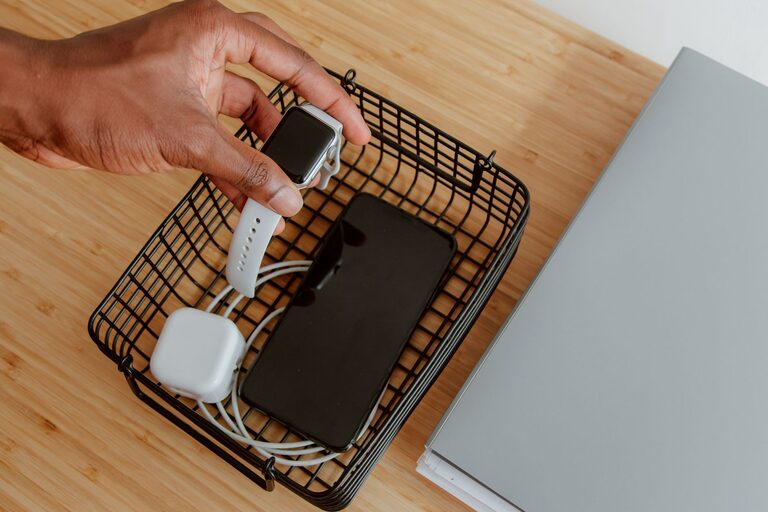
A dedicated charging station can make everyday life easier. Instead of searching for cables or finding devices scattered across a desk, counter, or nightstand, you can keep everything in one organized place. A well-planned station also helps reduce cable clutter and makes it easier to remember which devices need power.
You do not need a large workspace or expensive equipment to get started. With the right location, a few compatible chargers, and simple storage solutions, you can create a charging station that fits your home, office, or travel routine.
Start by deciding where your charging station should go. The ideal location depends on how and when you use your devices.
Common choices include:
– A desk or home office shelf
– A kitchen counter or entryway table
– A nightstand
– A living room console
– A shelf near a family command center
– A drawer or cabinet with access to an outlet
Choose a spot that is easy to reach but does not interfere with daily activities. For example, a charging station near the entryway may be convenient for phones and earbuds, while a desk station may work better for laptops and work-related accessories.
Keep the station away from sinks, water sources, direct heat, and areas where cables could become a tripping hazard. Make sure the surface is stable and large enough to hold the devices you plan to charge.
Before buying accessories, list the devices that need regular charging. This helps you avoid purchasing too many cables or choosing a station that is too small.
Your list may include:
– Smartphones
– Tablets
– Smartwatches
– Wireless earbuds
– E-readers
– Portable game systems
– Cameras
– Power banks
– Laptops
Note the connector used by each device. Many newer devices use USB-C, while some older products may use other connectors. Wireless charging may also be an option for compatible phones, watches, or earbuds.
Knowing your device mix will help you decide whether you need a basic multi-port charger, a wireless charging pad, a charging dock, or a combination of these options.
A charging station usually needs a power strip, wall charger, or multi-port charging hub. Look for products from reputable manufacturers and choose one with enough ports for your devices.
Consider these features:
– Enough ports for current and future devices
– A suitable power rating
– Built-in overload protection
– A compact design
– A clearly visible power switch, if useful
– Certification marks appropriate for your region
A multi-port USB charger can reduce the number of wall adapters on your desk. However, check that it can provide enough power for the devices you intend to charge at the same time. Some larger devices, such as tablets and laptops, may require more power than smaller accessories.
Avoid connecting too many power strips together. Do not use damaged chargers, frayed cables, loose outlets, or adapters that become unusually hot. When in doubt, follow the manufacturer’s instructions or ask a qualified electrician to check the setup.
Charging stations come in several formats. The best option depends on your available space and how many devices you use.
A dock provides individual slots for phones, tablets, or other devices. It is useful when several people share one station because each device has a defined place.
Choose a dock with wide, stable slots if you use protective cases. Narrow slots may require you to remove the case before charging.
A tray is a simple option for smaller spaces. Place the charger and cables inside the tray, then use dividers or small containers to separate devices.
This style works well on a console, desk, or kitchen counter. It also makes it easy to carry the entire setup to another location.
A drawer can hide cables and devices when they are not in use. You may need to create a small opening at the back of the drawer for the power cable.
Make sure the drawer is not tightly packed and that devices have room for airflow. Do not charge devices under clothing, papers, or other materials that can trap heat.
A wall-mounted shelf or organizer saves desk and counter space. It can be helpful in an entryway or shared family area.
Secure the organizer properly and position it near an outlet. Keep cables neatly attached to the wall so they do not hang loosely or create a hazard.
Cable management is one of the most important parts of a charging station. Start by assigning one cable to each regular device. Use hook-and-loop straps, cable clips, or reusable ties to keep cables together.
Helpful organization ideas include:
– Labeling cables by device
– Using different colors for different people
– Routing cables from the back of the station
– Leaving enough length for comfortable use
– Storing spare cables in a small labeled container
– Keeping rarely used cables separate
Avoid sharply bending cables near the connector. Repeated bending can damage the cable and make charging unreliable. Replace cables with exposed wires, loose ends, or damaged insulation.
You can also use adhesive cable clips to keep connectors in place. This prevents them from sliding behind furniture when a device is unplugged.
Wireless charging can reduce cable clutter, but it still requires a power cable for the charging pad. Place the pad on a flat, stable surface and make sure the device is centered correctly.
Some phone cases, metal accessories, wallets, or magnetic objects may interfere with wireless charging. If charging is inconsistent, remove the case or accessory and check the device manufacturer’s guidance.
Wireless charging can also produce warmth. Keep the pad and device in an open area, and avoid covering them with fabric or other materials.
If several people use the charging station, make it easy to identify each person’s space. Assign a labeled slot, basket, or cable to each user. This reduces confusion and helps prevent cables from being taken accidentally.
A small sign or printed label can show where each device belongs. You might also keep a spare common-use cable available for visitors, provided it is compatible with the devices in the home.
For children, place the station in a location they can use safely and teach them not to pull devices by their cables. Keep long cords away from walkways and areas where they can be caught or pulled.
Check the station regularly for dust, loose connections, and damaged equipment. Unplug chargers that are not needed, especially if the station will be unused for an extended period.
Follow these basic safety habits:
– Keep liquids away from the station
– Do not cover charging devices
– Use the correct charger for each device
– Replace damaged cords promptly
– Keep vents and outlets clear
– Avoid overloading outlets
– Do not charge devices on soft surfaces such as beds or sofas
Keep batteries and devices at a comfortable room temperature. If a device, charger, or cable becomes unusually hot, stop using it and review the manufacturer’s instructions.
A charging station works best when everyone uses it consistently. Set a routine for returning devices after use and checking battery levels at a convenient time, such as before bed or before leaving for work.
Once a month, remove unused cables, wipe the surface, and confirm that every charger still works. Update the setup as your devices change. A station that fits your needs today may need additional space or different cables later.
With a suitable location, reliable charging equipment, and a little cable organization, you can create a charging station that keeps devices ready without adding clutter to your home.
